What is AutoHotKey?
AutoHotKey is a scripting (programming) language that lets you write simple code to automate daily tasks. It can type, simulate your mouse, and even look for things on your screen. If you’re doing something repetitive that doesn’t involve choices or thinking then this might be something you can automate.
AutoHotKey is one of a handful of tools that fall into the umbrella of Robotic Process Autotomation (RPA), a buzzword in management/IT circles for helping to delegate admin back to your computer.
Where do I get it?
You can download AutoHotKey from https://www.autohotkey.com/ but make sure you download the ‘Current Version’ rather than the v2 Beta as the vast majority of online tutorials/scripts/resources are targetted at this.
If your IT team have allowed you the ability to install autohotkey then you can just run the installer, if not then read below for some tricks and tips to install it yourself.
Installation without Admin Privileges
If you want to run AutoHotKey as a user without installing it on your system, you need to download an alternative format - a zip file instead of an installer. You can do this by going to https://www.autohotkey.com/download/ and selecting Download AutoHotkey .zip
Extract the zip file to a folder in your Documents (or anywhere you like). If you’re still stuck you can find a more in depth tutorial here.
How do I run it?
AutoHotKey isn’t run directly, instead you will create or download an autohotkey script (file extension .ahk) and use this to launch AutoHotKey.
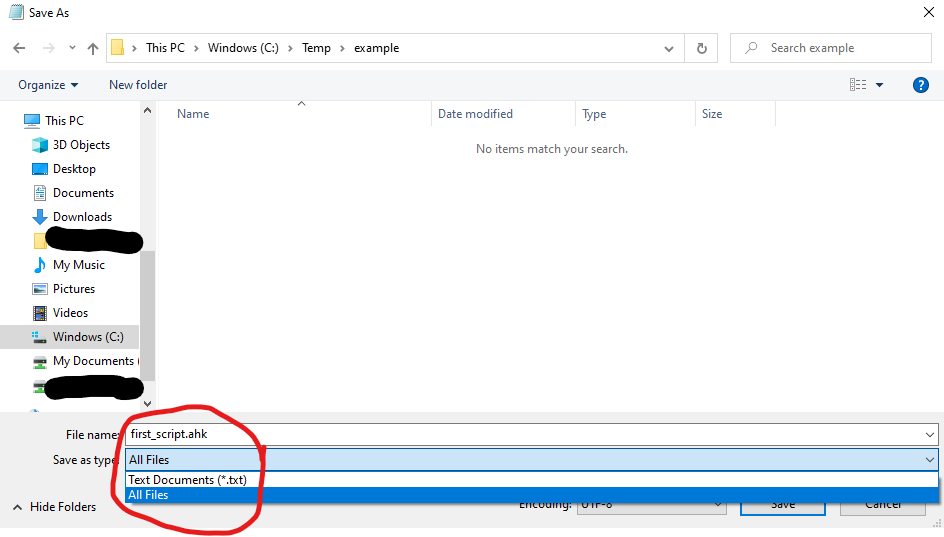
You can find a tutorial on the (AutoHotKey website)[https://www.autohotkey.com/docs/Tutorial.htm]. If you haven’t run the installer, then instead of following step 2 and 3 in ‘How to create a script’, you can instead use notepad, but remember to change the file type to All Files as per the screenshot below to prevent your file being saved as script.ahk.txt
Where can I learn more?
You can read the documentation for AutoHotKey at the official website.
If you need support they have a great forum with lots of examples and useful scripts at https://www.autohotkey.com/boards/
I will be posting my own scripts and useful code over the upcoming weeks/months tagged under autohotkey, so make sure to check for any clinician targetted scripts to save you time.
As always, if you have some thoughts on this or useful ideas to share, please get in touch!